Grading in WP Admin
The front-end queue serves graders and mentors, scoped to what each may mark. Tangible Quiz → Grading answers the site-wide question: how grading stands across every quiz.
The page requires the quiz_manage_grading capability, which administrators hold implicitly. A grader without it keeps working from the front-end queue.
The listing
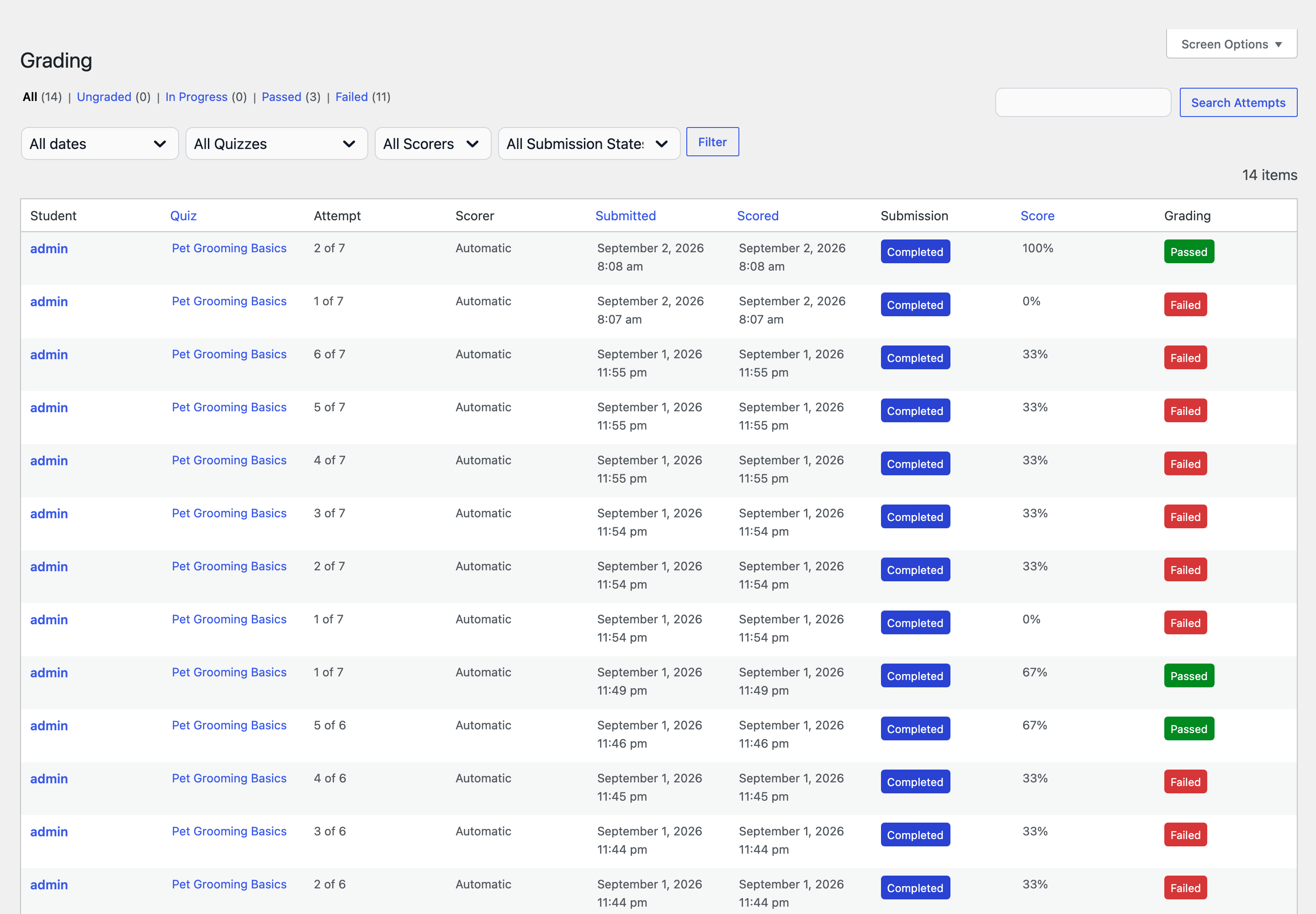
Every attempt on the site, one row each, including fully machine-scored attempts, which list their scorer as Automatic.
Status views across the top carry live counts and filter the list: All, Ungraded, In Progress, Passed, Failed. Below them sit filters for submission month, quiz, scorer, and submission state, plus a candidate search. The columns:
| Column | What it shows |
|---|---|
| Student | The candidate. |
| Quiz | The quiz, with an "N of M items scored" caption for work in flight. |
| Attempt | Which of the candidate's attempts this is, respecting granted extras. |
| Scorer | Who is marking it, with their open workload, or Automatic. |
| Submitted | When the candidate submitted. |
| Scored | When it was graded, or –. |
| Submission | Where the attempt stands. |
| Score | The result, once there is one. |
| Grading | The verdict chip. |
The row action matches the row's state (Grade, Resume Grading, Review Grading, or View) and opens the attempt in the entry view. Submitted, scored, score, and quiz title are sortable. Dates follow the site's date and time settings.
The entry view
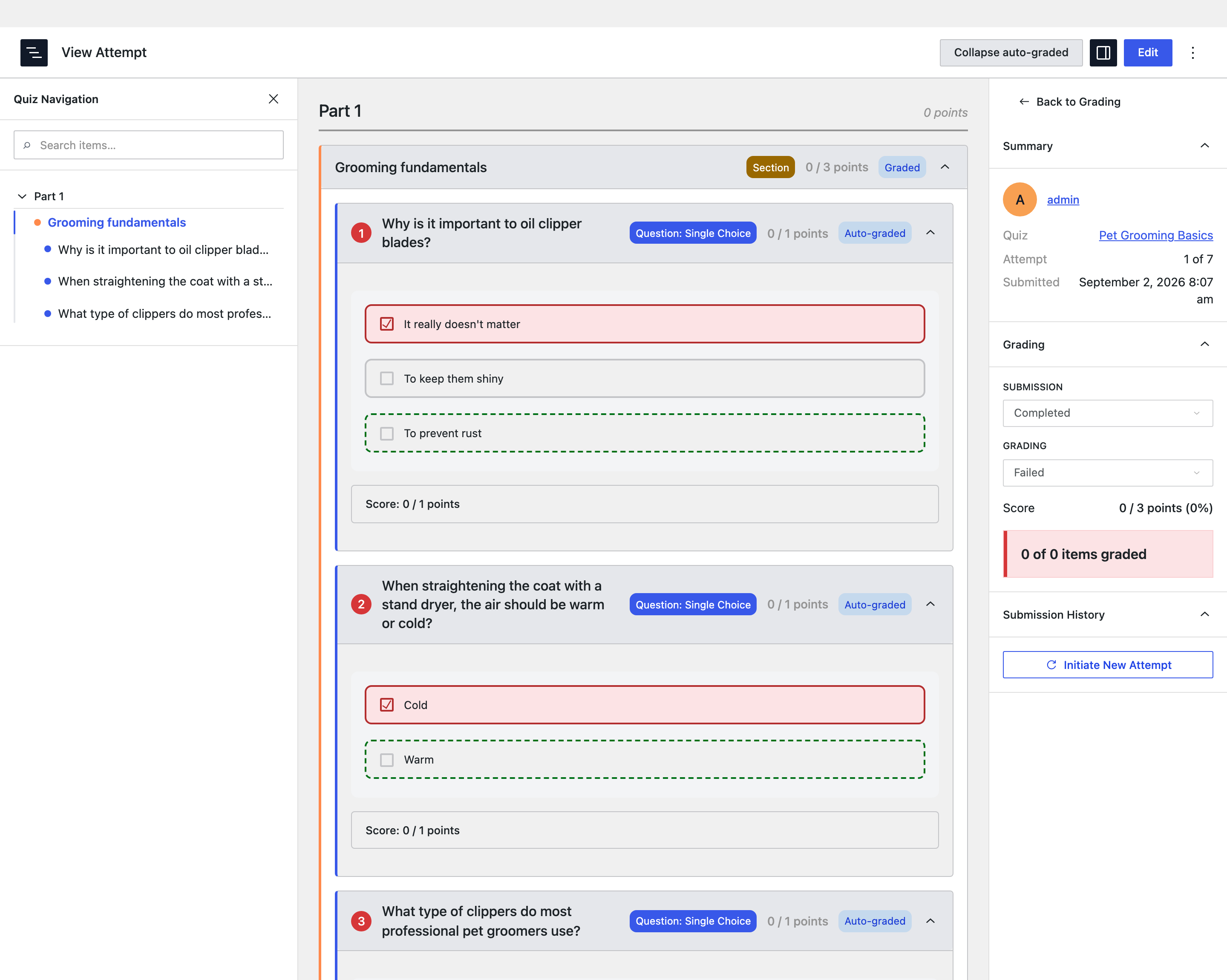
Opening an attempt lands on the same editor chrome as the quiz and course editors: a navigation pane, the question cards, and an inspector.
The navigation pane lists the quiz's structure. The current row follows your scroll through the cards, and clicking a row jumps to its card. Question markers colour by pass status; sections are containers and carry no mark of their own.
The cards are the same cards, verbs, and rules as the front-end grading view. Two things this view adds:
- Every question is visible, auto-scored ones included, shown read-only with their machine verdict. Choice questions render the candidate's picks against the answer key, so a mixed quiz reads as one submission.
- The note is a full rich-text editor, and earlier notes on a question are listed beneath it, so a regrade can see what the candidate was already told.
The inspector carries the attempt's summary, with the quiz and student linked to their edit screens, the score totals against the pass threshold, each scorer's workload, and the Submission History panel with Initiate New Attempt, exactly as on the front end.
The view has two modes, following the attempt's state: grade (inputs, per-card save, batch actions) and view (read-only, with an Edit button back). The pass or fail shown everywhere is the server's stored verdict, never recomputed on screen, so an attempt fully marked but not yet settled stays In Progress.
A few things render disabled by design: the status selects report derived state but are not yet commands, and Grade Section waits on section-level release. A disabled control here is planned work, not a permissions problem.