Condition groups
Three course settings (Enrollment Triggers, Visibility, and Prerequisites) are configured with the same rule builder.
How the logic works
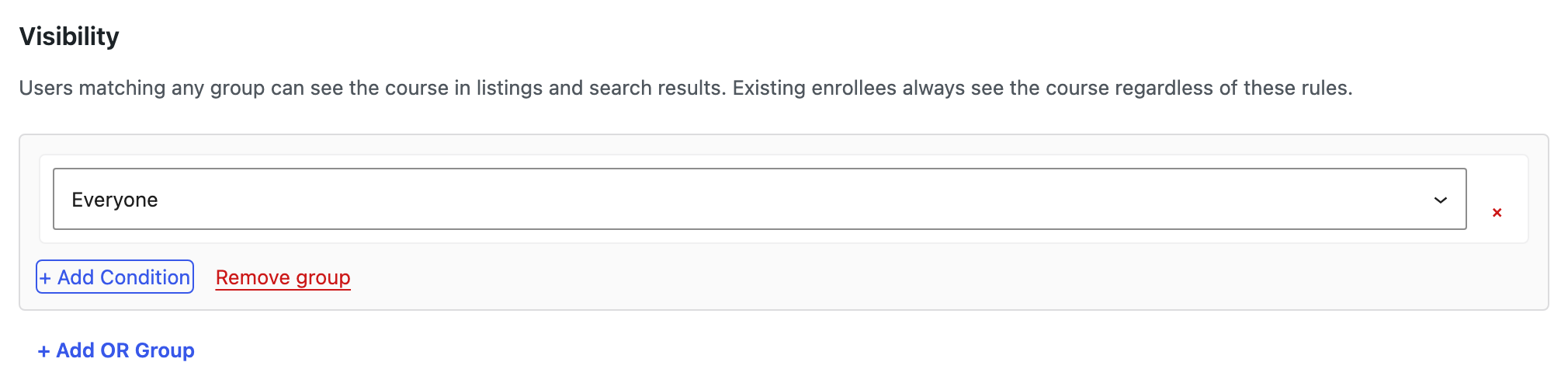
A rule is a list of groups. Each group is a list of conditions.
- Within a group, conditions are ANDed. Every condition in the group must be satisfied.
- Between groups, it is OR. The user needs to satisfy any one group to qualify.
So a rule reading
Group 1: User role is Subscriber AND Course 164 is completed Group 2: User role is Editor
qualifies subscribers who have finished course 164, and it qualifies every editor regardless of what they have completed.
There is no OR inside a group. To express "role is subscriber or role is customer", make two groups with one condition each rather than trying to combine them in one.
Building a rule
- Click + Add OR Group. An empty group appears.
- Click + Add Condition inside it. The condition defaults to Everyone.
- Change the condition type with the dropdown, then fill in whatever that type needs.
- Add further conditions to the same group to narrow it (AND), or add another group to widen the rule (OR).
- Remove a single condition with the red ✕ beside it, or the whole group with Remove group.
- Click Push Settings Live to save.
An empty rule is not a rule that matches nobody. It means the constraint is not applied at all, and each section says so in place: no visibility rules, the course is visible to all users, and so on.
Condition types
| Type | Operators | What it checks |
|---|---|---|
| Everyone | — | Always matches. Useful as a deliberate catch-all group. |
| Login state | — | Whether the visitor is Logged in or Logged out. |
| User role | is, is not | The user's WordPress role. |
| Date | is after | Whether a calendar date has passed. |
| Course | is completed, has started | The user's state on another course. |
| Course last completed | last completed more than | How long since the user completed a given course. |
Login state is the condition that can see guests. A guest has no role, so no User role rule can describe them: a rule meant to admit the public needs Logged out or an Everyone group. There is no operator dropdown; the two states are the choice.
Course last completed takes an amount and a unit (day, week, month, or year) so "last completed more than 6 months ago" is expressible directly. It is the condition to use for recertification cycles, where someone becomes eligible again a fixed period after finishing.
The Course and Course last completed types need you to identify which course. Pick the target course; the rule then evaluates against that user's record for it.
Where each rule is evaluated
The same builder means the same syntax, but the three settings are consulted at different moments, and that changes what a rule sensibly says.
| Setting | Evaluated when | A useful rule looks like |
|---|---|---|
| Enrollment Triggers | A user's state changes in a way that might now match | "Role is now student" → auto-enroll |
| Visibility | Course listings and search are rendered | "Role is member" → only members see it |
| Prerequisites | A user attempts to enroll | "Course 164 is completed" → must finish part 1 |
Because triggers fire on state change, a trigger is not a retroactive sweep. Adding a trigger does not enroll everyone who already matches it; it enrolls people as they come to match it from then on.
Extending the condition types
The condition catalogue is a filtered registry, so a plugin can add its own condition types alongside the built-in ones:
add_filter('tangible_rule_engine_registry', function (array $registry): array {
    $registry['user_group'] = MyPlugin\Conditions\UserGroupCondition::class;

    return $registry;
});
Tangible LMS registers its own six conditions through this filter, so a third-party condition is not a second-class citizen. It appears in the same dropdown and is evaluated the same way.